Issue / Symptom | Practical Example | Fix | Repair Price |
| APv3 :: Case Damaged or Tacky / Melting / Peeling | Replace APv3 Case |
| |
| APv3 :: Buttons Missing / Damaged / Unresponsive | Replace APv3 Buttons |
| |
| APv3 :: No / Inconsistent Power, Won't Turn On |
| Requires Inspection |
|
| APv3 :: OBDII Cable Tabs Broken / Missing | Replace APv3 OBDII Cable |
| |
| APv3 :: Screen Damage, Black (still connects to APM), Bizzare Behavior | Replace APv3 Screen |
| |
| APv3 :: Serial Connector Corrosion | Replace APv3 Logic Board + OBDII Cable |
| |
| APv3 :: Software :: Cannot Communicate with Vehicle | 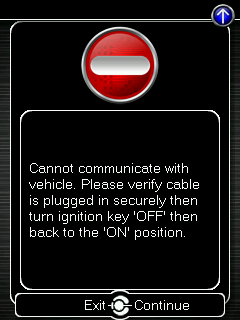 | https://www.cobbtuning.com/troubleshooting-accessport-communication-and-flashing-errors/ |
|
| APv3 :: Software :: Fatal Error | If you receive this screen when attempting to connect to your vehicle, flash a new Map, or after Installation, the AP is likely out of storage space. |
| |
| APv3 :: Software :: Please Verify Ignition is On | 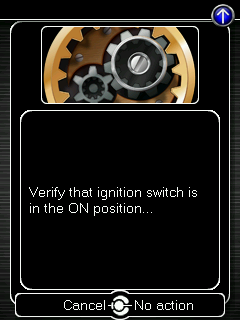 | https://www.cobbtuning.com/troubleshooting-accessport-communication-and-flashing-errors/ |
|
| APv3 :: Software :: Stuck on Splash Screen | Requires Inspection |
| |
| APv3 :: Software :: Unable to Update OBD Hardware | Replace APv3 + OBDII Cable |
| |
| APv3 :: Stuck in Update Mode |
|
|
Common Accessport (AP) Repairs & Estimated Cost

Comments
0 comments
Article is closed for comments.